WhatsApp Business API: What It Is, Costs and Setup (2026)
The WhatsApp Business API explained: Cloud API, templates, webhooks, per-message costs, messaging limits and the three ways to get access.
 Nicolas ProvostMar 25, 2026 · 18 min read
Summarize this article with an AI
 ChatGPT
 Claude
Table of contents (44)
Key takeaways
- The WhatsApp Business API is Meta's Cloud API: your software sends messages through Meta, with approved templates to start a conversation and free-form replies inside a 24-hour customer service window.
- Access is free, but Meta charges per delivered message by category and recipient country, for example $0.0635 per marketing message in the UK.
- A new business portfolio can message 250 unique customers per 24 hours outside a service window; verifying your business is one of the ways to reach 2,000.
- You can connect a number already used in the WhatsApp Business app and keep the app, and Kanal handles the API setup for Shopify stores, with plans from $89 a month.
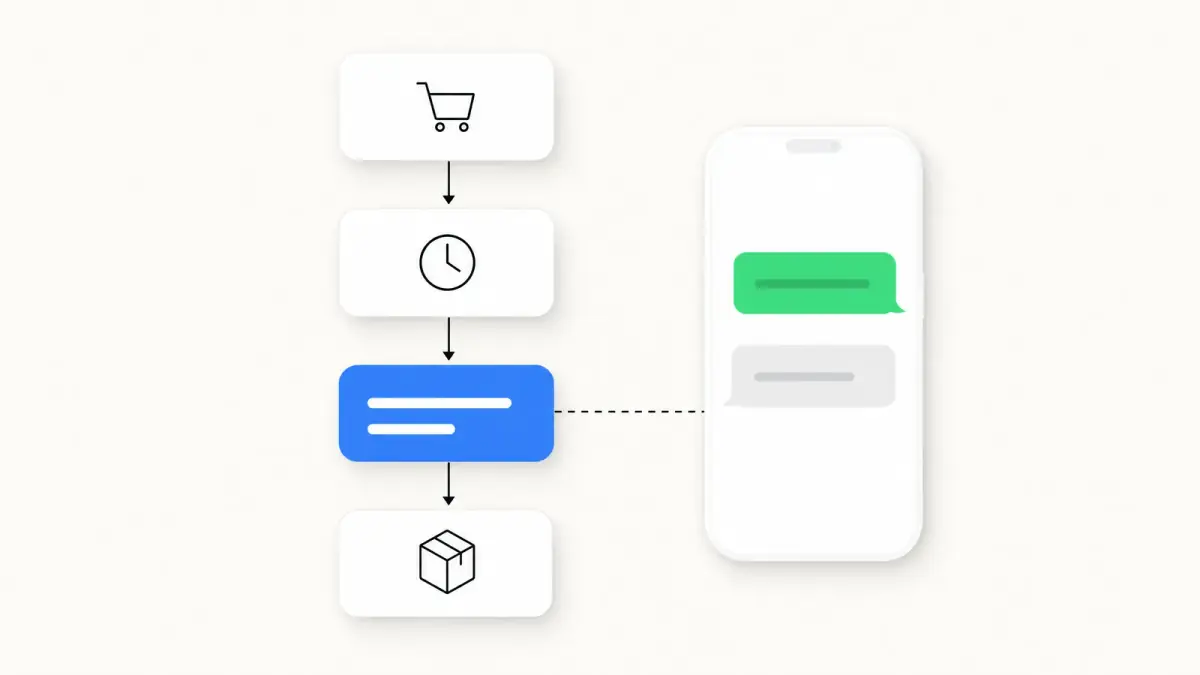
The WhatsApp Business API, which Meta now calls the WhatsApp Business Platform, is the programmable way to send and receive WhatsApp messages: your software, or a platform such as Kanal, calls Meta's Cloud API, and Meta delivers the messages. It starts conversations with pre-approved templates, replies freely inside a 24-hour customer service window, and reports every delivery back to your systems.
This guide explains how the API works, what it costs per message, the limits Meta applies and the three ways to get access. If you are still deciding between the free app and the API, our WhatsApp Business app vs API comparison covers that choice in detail.
What Is the WhatsApp Business API?
The WhatsApp Business API (now called WhatsApp Business Platform by Meta) is a programmatic interface that lets businesses send and receive WhatsApp messages at scale. Meta hosts it as the Cloud API: the older On-Premises version, which businesses hosted themselves, can no longer send messages since its last client expired on October 23, 2025, according to Meta's sunset notice.
Source: Meta, WhatsApp Business Platform product page, read on October 23, 2026.
The building blocks of the API
Everything you do with the API goes through six objects, as Meta's Cloud API get started guide sets them up:
- Business portfolio: your company in Meta's systems. Messaging limits are set at this level and shared by all of its phone numbers.
- WhatsApp Business account: the account that holds your phone numbers and templates and carries your billing currency. Meta's documentation now also calls it a Messaging account.
- Business phone number: the number your customers see, with its display name and business profile.
- Message templates: pre-approved messages, the only way to start a conversation. Each one is categorized as marketing, utility or authentication, which sets its price.
- Webhooks: Meta sends incoming messages and delivery statuses (sent, delivered, read) to your server or your platform's.
- The 24-hour customer service window: when a customer messages you, you can reply with free-form messages for 24 hours, and each new customer message resets the timer.
A platform such as Kanal sets these up for you and adds what the API does not include: an inbox, automated flows, campaigns and reporting. The WhatsApp CRM page shows how Kanal keeps each customer's conversations and orders together.
Do you need the API or the app?
The free WhatsApp Business app runs on a phone and suits a few people answering chats by hand. The API is for automation, several agents on one number and integrations with your store. If you want to automate cart recovery and campaigns, you need the API. The decision criteria by store size are in the comparison linked above.
WhatsApp Business API Pricing
Since July 1, 2025, Meta charges per delivered message, not per conversation, as laid out in its official pricing documentation. You pay when a template message is delivered, at a rate set by its category and the recipient's country. Each customer message opens a 24-hour customer service window in which you can reply freely: these service replies were not charged until September 30, 2026. Since October 1, 2026, they cost the utility rate after 1,000 free service messages per business phone number each month.
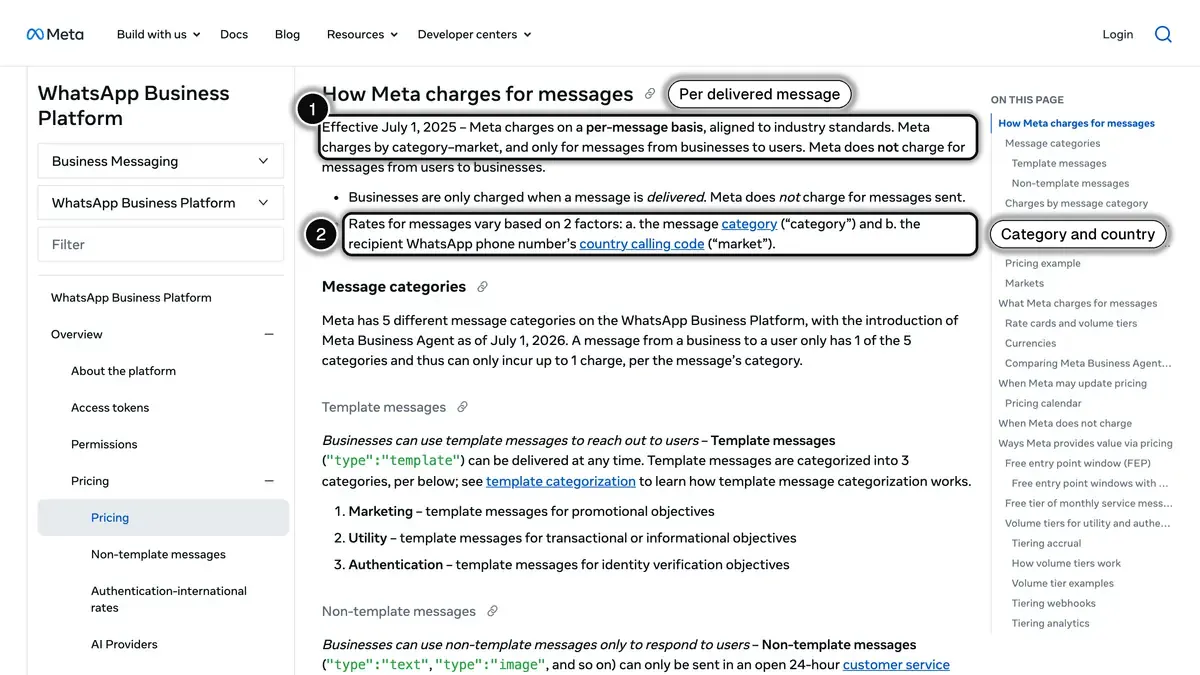
Source: Meta, Pricing on the WhatsApp Business Platform, section "How Meta charges for messages", read on October 23, 2026.
Message Categories & Costs (2026)
| Category | Description | Cost (US) | Cost (France) |
|---|---|---|---|
| Marketing | Promotions, offers, campaigns | $0.0250 (not delivered to US numbers) | $0.0859 |
| Utility | Order updates, shipping, receipts | $0.0034 | $0.0300 |
| Authentication | OTP codes, login verification | $0.0034 | $0.0300 |
| Service | Your replies inside the 24-hour customer service window (not a template) | Utility rate after 1,000 free per number each month | Utility rate after 1,000 free per number each month |
Prices are per delivered message, in USD, from Meta's rate card effective October 1, 2026, read on Meta's rate calculator on October 23, 2026. US prices are Meta's North America rates, and Meta does not currently deliver marketing templates to US phone numbers. Since October 1, 2026, a service message costs the utility rate of its market, after 1,000 free service messages per business phone number each month.
Cost Example: Shopify Store with 10,000 Customers
The volumes below are illustrative assumptions: replace them with your own store's numbers. Costs use Meta's UK rates per delivered message: $0.0635 per marketing message and $0.0220 per utility message. (Meta has paused marketing templates to US numbers since April 1, 2025, see our US guide, so a US store would not send the marketing lines.)
| Use Case | Monthly Messages | Cost |
|---|---|---|
| Cart recovery | 1,500 marketing | $95.25 |
| Order notifications | 3,000 utility | $66.00 |
| Customer support | 500 service | Not charged (within the 1,000 free since Oct. 1, 2026) |
| Monthly campaign | 5,000 marketing | $317.50 |
| Total | 10,000 | $478.75 |
To judge whether that bill pays off, compare it with the revenue your flows bring back, measured against a holdout group that does not receive the messages. For rates by country, UK prices in pounds and how to model your monthly bill, see the WhatsApp Business pricing guide.
Check Kanal's transparent pricing: we pass WhatsApp (Meta) fees through at cost, with no per-message markup, and plans start from $89/month. The pricing page includes a cost simulator that shows your total, WhatsApp fees included.
How to Set Up the WhatsApp Business API
There are three ways in. They differ in who builds and maintains everything around Meta's API.
Option 1: Build directly on Meta's Cloud API
Meta's get started guide walks a developer through these steps:
- Create a Meta app with the "Connect with customers through WhatsApp" use case, linked to your business portfolio
- Connect a WhatsApp Business account and add your business phone number
- Set up a webhook endpoint to receive incoming messages and delivery statuses
- Create a system user and generate a permanent access token
- Submit your message templates for review
- Verify your business to raise your messaging limit (see below)
After that, you still build the inbox, the flows, the Shopify connection and the reporting yourself, and you maintain them as Meta's API evolves.
Option 2: Through a Business Solution Provider
Business Solution Providers (BSPs) such as Twilio or 360dialog give developers access to the API with their own tools and billing. You still write the integration with your store. Our comparison of WhatsApp Business API providers breaks down pricing and features across the main players.
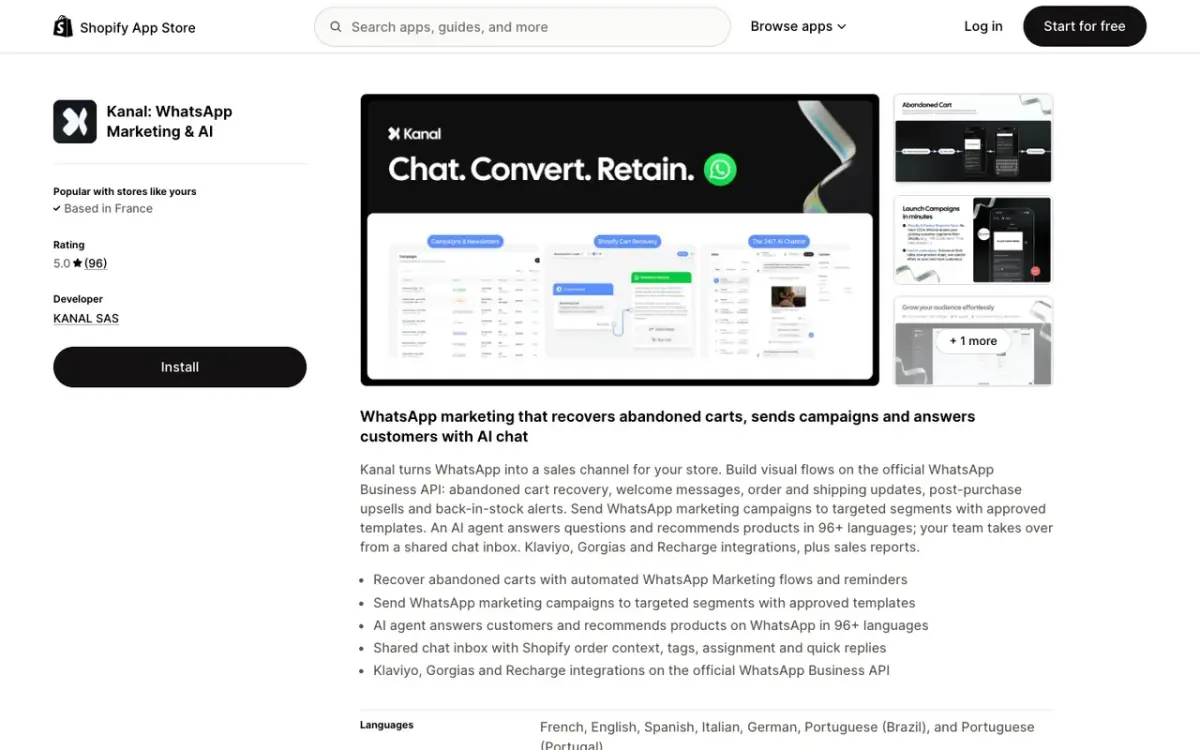
Option 3: Through a Shopify app like Kanal
- Install Kanal from the Shopify App Store
- Connect your WhatsApp number: Kanal is set up in 5 minutes
- Kanal handles the Meta setup and the submission of your templates
- Turn on your flows and campaigns from a visual dashboard
The step-by-step version, with screenshots, is in our guide to connecting WhatsApp to Shopify.
Key WhatsApp Business API Features
Message Templates
Template messages are pre-approved message formats that let you initiate conversations with customers. They can include:
- Text with dynamic variables ({customer_name}, {order_number})
- Media headers (image, video, or document)
- Interactive buttons (quick replies or URL buttons)
- Call-to-action buttons (call phone number, visit website)
Templates must be submitted to Meta for approval before use: Meta says a decision can take up to 24 hours. Our WhatsApp Business templates guide has ready-to-submit examples for each category.
Automated Flows
The API sends the messages; the flows that decide when to send them live in your platform. In Kanal, WhatsApp automations start from Shopify events and customer actions:
- Abandoned checkout: a reminder with the product image and a payment link, then a second nudge if needed
- Post-purchase: product recommendations after an order
- Back-in-stock: a message when a product your customer wanted is available again
- Welcome series: a few messages to onboard new subscribers
- Review collection: a review request after delivery
AI Chatbot
The API carries the conversation; the AI comes from your platform. Kanal's AI chatbot answers from your Shopify catalog, store policies and FAQ:
- Answers product, sizing, shipping and return questions
- Gives order status from Shopify
- Recommends products from your catalog
- Hands off to your team when a conversation needs a person
Our WhatsApp chatbot for ecommerce guide walks through the setup, ready-to-use flows, and how to measure the results.
Team Inbox
The API has no inbox of its own: your platform provides it. Kanal's shared inbox shows the Shopify order next to each conversation, with assignment, tags and quick replies. If your support team works in a helpdesk, the Gorgias and Zendesk integrations turn WhatsApp conversations into tickets there.
WhatsApp Business API + Shopify Integration
Kanal's Shopify integration connects your store data to WhatsApp for automated, personalized messaging:
What Kanal uses from Shopify
- Customers and orders: name, phone number and order history, used in message variables and segments
- Shopify events that start flows: order created, abandoned checkout, shipping status
- Product catalog: what the AI chatbot answers from
- Segments: customers by number of orders, or by orders over a period
Automated Workflows
Once connected, these workflows run automatically:
- Cart recovery: customer abandons checkout → WhatsApp reminder with product image and payment link → customer returns to the checkout from the message
- Order confirmation: order placed → WhatsApp confirmation with order notifications
- Shipping update: order shipped → WhatsApp notification with tracking link
- Review request: order delivered → WhatsApp request for a product review
- Win-back: no recent purchase → WhatsApp offer to re-engage
CRM Integrations
- Klaviyo: target your Klaviyo segments with WhatsApp campaigns and send WhatsApp templates from your Klaviyo flows, while email stays in Klaviyo
- Gorgias: every WhatsApp conversation becomes a Gorgias ticket, and agents reply from Gorgias
- Loyoly: loyalty notifications (points, rewards, offers) on WhatsApp
- Splio: WhatsApp messages triggered from your Splio CRM segments and automations
- Zendesk: WhatsApp messages arrive as Zendesk tickets, and agent replies go back on WhatsApp
Connecting a Number You Already Use
Many Shopify brands start with the free WhatsApp Business app. Meta offers two ways to move to the API.
Keep the WhatsApp Business app on the same number
Meta lets a partner onboard a WhatsApp Business app number to the Cloud API, a feature support teams often call coexistence. According to Meta's documentation, read on October 23, 2026:
- You keep sending one-to-one messages from the app, and messages are mirrored between the app and the API
- Chats from the most recent 6 months, and your contacts, can be synchronized to the platform
- Broadcast lists in the app are disabled (existing ones become read-only), and group chats are not synchronized
- Messages you send from the app stay free; messages sent through the API follow API pricing
- The number is limited to 20 messages per second
Ask your platform whether it supports this onboarding before you start.
Use a number dedicated to the API
The alternative is to register a number on the API alone, often a new one. Before you switch a number you already use:
- Back up your chat history: run a manual WhatsApp backup to Google Drive or iCloud, and export the conversations you need (Chat > More > Export chat)
- List your saved replies, labels and catalog, to recreate them on the platform
- Re-import your opted-in contacts (Shopify customers sync automatically with Kanal)
- Submit your most-used templates for Meta approval and test every flow before announcing the change
WhatsApp Business API Rate Limits Explained
Meta enforces two kinds of limits on outgoing messages: how many customers you can reach in 24 hours, and how fast you can send.
Messaging tiers
New business portfolios start at 250 unique customers per 24 hours, outside customer service windows, and move up as described on Meta's messaging limits page (read on October 23, 2026):
| Limit (unique customers/24h) | How to unlock |
|---|---|
| 250 | Default for new business portfolios |
| 2,000 | Complete a scaling path: verify your business, have your partner verify it, or send 2,000 delivered messages outside customer service windows within 30 days using high-quality templates |
| 10,000 | Automatic: high-quality messages and at least half of the current limit used in the last 7 days |
| 100,000 | Same rule |
| Unlimited | Same rule |
When the criteria are met, Meta raises the limit by one level within 6 hours. The limit belongs to the business portfolio, so all your numbers share it.
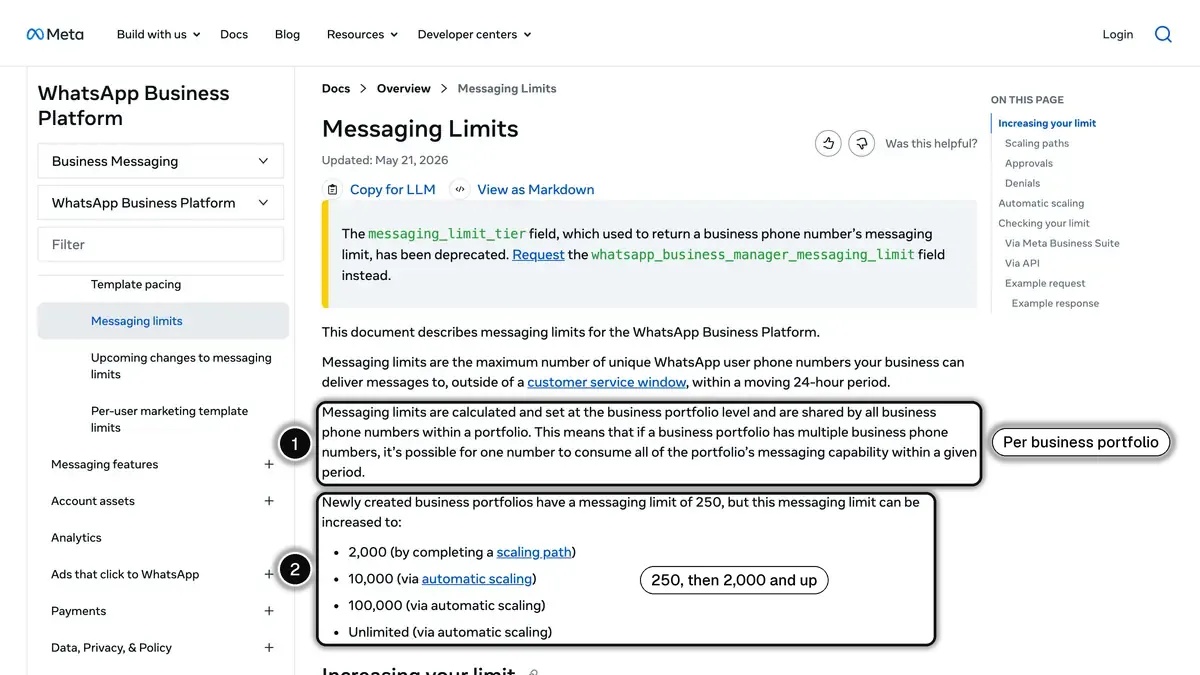
Source: Meta, Messaging Limits (developer documentation, updated May 21, 2026), read on October 23, 2026.
The fastest way to climb tiers: send well-targeted templates with low opt-out rates and high engagement.
Throughput limits
Within your limit, Meta also caps the number of messages per second. According to Meta's throughput documentation:
- Each business phone number can send up to 80 messages per second by default
- Meta upgrades a number to 1,000 messages per second automatically once its portfolio has an unlimited messaging limit, the number has messaged at least 100,000 unique customers outside service windows in a moving 24-hour period, and its quality rating is Medium or higher
- A number used in both the WhatsApp Business app and the API stays at 20 messages per second
For broadcast campaigns to very large lists, plan to spread sends over time rather than all at once.
Quality Rating: How to Keep Your Number Healthy
Meta rates every WhatsApp Business number Green (high), Yellow (medium), or Red (low) from the feedback of the customers who received your messages over the past seven days, such as the reasons they give when they block you. Each template has its own rating too. Our WhatsApp quality rating guide covers the rules in detail.
What hurts your quality rating
- Blocks, with reasons such as "Didn't sign up" or "Spam"
- Reports of spam or unwanted content
- Low read rates on your templates
- Messages to people who never opted in
What protects it
- Strict opt-in collection with a clear value proposition
- Personalized templates with merge fields (name, order ID)
- Two-way conversational flows (with quick replies or an AI chatbot)
- Honoring opt-outs immediately
- A sending frequency your customers expect
What a low rating changes
- A template that reaches a low rating is paused automatically: 3 hours the first time, 6 hours the second, then disabled
- Automatic increases of your messaging limit require high-quality messages across all your numbers and templates
- If a business keeps sending templates that reach a low rating, Meta says the phone number itself may eventually be affected
Kanal reads the Meta quality rating of each connected number, and a customer who replies STOP (or an equivalent keyword in several languages) is opted out automatically.
Common WhatsApp Business API Mistakes
These are the mistakes to avoid when you move a Shopify store to the API.
Mistake 1: Skipping template categorization
In the UK, sending an order confirmation as a marketing template costs $0.0635 per delivered message instead of $0.0220 as a utility template. Always categorize properly when submitting templates to Meta.
Mistake 2: Buying contacts or scraping numbers
Meta cracks down on bought lists. Numbers used to message contacts who never opted in collect blocks and reports, the signals that pull a quality rating down and can lead to a ban. Build your list organically through opt-in popups, checkout, and WhatsApp links.
Mistake 3: Ignoring template approval status
A template can only be sent once Meta has approved it, and the decision can take up to 24 hours. Plan launches around it. In Kanal, a campaign scheduled on a template that is still pending waits for Meta's approval before sending.
Mistake 4: Using a team member's personal number
Use a number that belongs to the business. It becomes your brand's sender identity, sits in your business portfolio, and should not depend on one employee's phone.
Mistake 5: Underestimating Meta verification
Business verification is one of Meta's paths to the 2,000 limit. Start it before you need to launch your first campaign. The verified badge has its own requirements: see our WhatsApp verified badge guide.
Mistake 6: No fallback channel
If a customer doesn't have WhatsApp, your message simply doesn't deliver. The strongest stacks combine WhatsApp, SMS, and email. With Klaviyo + Kanal, the WhatsApp messages are triggered from your Klaviyo flows, next to the email and SMS steps you keep in Klaviyo.
WhatsApp Business API vs Other Channels
| WhatsApp API | SMS | Push Notifications | ||
|---|---|---|---|---|
| Rich Media | Yes | No (SMS) / Yes (MMS) | Yes | Limited |
| Two-way Chat | Yes | Limited | No | No |
| How you pay | Per delivered message, at Meta's rate for the category and country | Per message, set by your SMS provider | Set by your email plan | Set by your push provider |
WhatsApp works alongside email and SMS rather than replacing them. Compare open, click and reply rates per channel in your own reports.
Compare the best Shopify marketing apps to build your optimal stack, including the best abandoned cart apps and best SMS apps.
FAQ
Is the WhatsApp Business API free?
The API itself is free to access. Meta charges per delivered template message, at published rates that depend on the category (marketing, utility, authentication) and the recipient's country. Replies inside the 24-hour customer service window were not charged until September 30, 2026. Since October 1, 2026, they cost the utility rate after 1,000 free service messages per business phone number each month.
How long does WhatsApp Business API setup take?
Through a Shopify app like Kanal, the setup takes about 5 minutes: you install the app and connect your WhatsApp number. Building directly on Meta's Cloud API takes developer work: a Meta app, a webhook endpoint, a permanent access token and your own interface. In both cases, Meta says a template approval decision can take up to 24 hours.
Can I keep my existing WhatsApp number?
Yes. Meta lets a business connect the number it already uses in the WhatsApp Business app to the Cloud API through a partner's onboarding flow (often called coexistence). The app keeps working for one-to-one chats, chats from the most recent 6 months can be synchronized, and broadcast lists in the app become read-only. A number used in both places is limited to 20 messages per second.
What's the difference between WhatsApp Cloud API and On-Premise API?
The Cloud API is hosted by Meta and is now the only version that sends messages: the last On-Premises API client expired on October 23, 2025. Our WhatsApp Cloud API vs On-Premise comparison covers the full migration picture.
How many messages can I send per day?
New business portfolios start with a messaging limit of 250 unique customers per 24 hours, outside customer service windows. This rises to 2,000 once you complete one of Meta's scaling paths (business verification, for example), then automatically to 10,000, 100,000 and unlimited as long as you send high-quality messages and use at least half of your current limit.
Conclusion
The WhatsApp Business API is the infrastructure behind e-commerce messaging at scale: templates to start conversations, a 24-hour window to reply, webhooks to track every delivery, and per-message pricing. What you build on top (flows, inbox, AI, reporting) decides what it does for your store.
The easiest way to get started: install Kanal on your Shopify store. We handle the API setup and template submission, and give you a visual dashboard for all your WhatsApp commerce needs.
Also worth reading: Shopify itself now includes a WhatsApp channel in Shopify Messaging (see its pricing, features and limits).
Book a demo to see Kanal running on a Shopify store, or start with our WhatsApp tools, including the WhatsApp number checker.
See Kanal on your own store
- Your campaigns and cart reminders on WhatsApp, starting from your own store
- Post-purchase offers, back-in-stock alerts, then the AI agent that advises your customers
- You leave with the plan that fits and its price
From €89/month
- brands
- 500+
- to set up
- 5 min
- open rate on WhatsApp
- +90%
Nicolas helps e-commerce brands grow revenue with WhatsApp marketing. With deep expertise in Shopify ecosystems and conversational commerce, he shares proven strategies for abandoned cart recovery, broadcast campaigns, and AI-powered customer engagement.