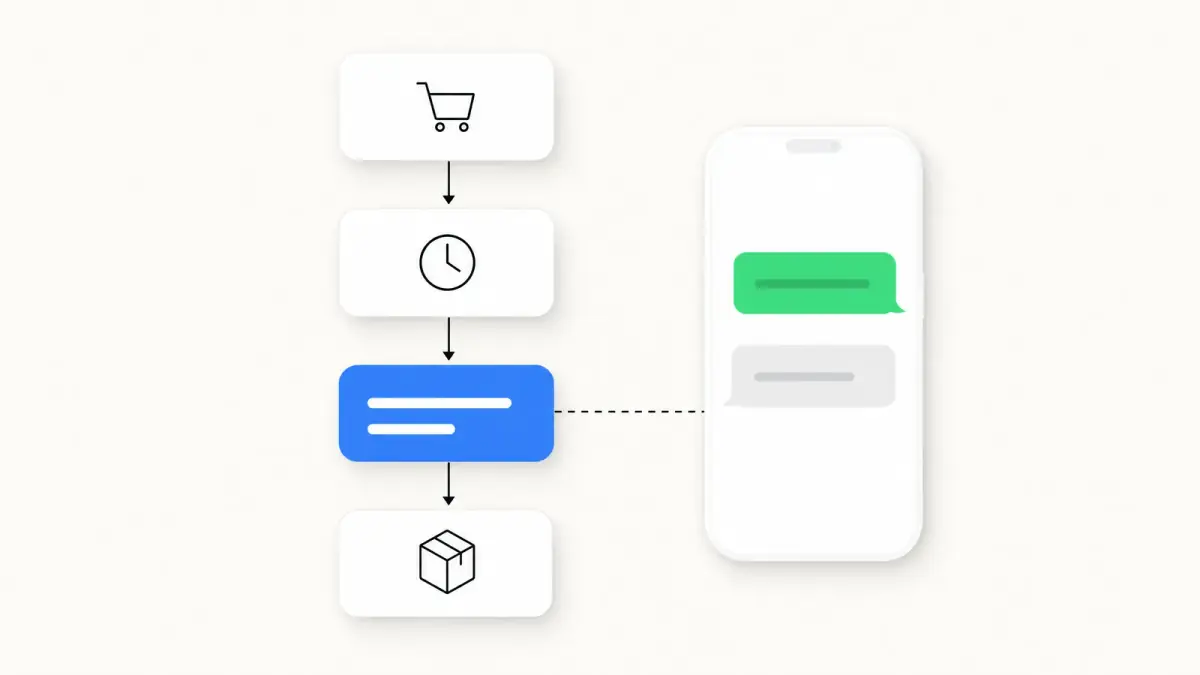
WhatsApp Marketing ROI: 12 KPIs and How to Measure Them
Measure WhatsApp marketing ROI with 12 KPIs and their formulas, Meta's real message fees (France, read Oct 24, 2026), attribution windows and a holdout test.
 Nicolas ProvostMay 19, 2026 · 16 min read
Summarize this article with an AI
 ChatGPT
 Claude
Table of contents (33)
Key takeaways
- Revenue per recipient is the most useful WhatsApp KPI because it folds read rate, click-through and conversion into one figure per flow.
- ROAS must divide attributed revenue by the full cost, meaning the platform subscription, Meta's message fees and team time.
- Hold out 10 percent of an opted-in segment to measure true incremental lift, the number that survives scrutiny from finance.
WhatsApp marketing only proves its worth if you measure it correctly. Vanity metrics like open rate hide the real signal, and without a clean measurement setup, brands either over-celebrate trivial wins or under-invest because they cannot prove the ROI to their finance team.
This guide is the operating manual for measuring WhatsApp marketing in 2026. Twelve KPIs every Shopify brand should track, the formulas behind each, the attribution setup that holds up under scrutiny, and how to build your own benchmark. Plug your own numbers into our ROAS break-even calculator at any point to see where your store actually lands.
Why WhatsApp KPI Tracking Breaks
Three patterns make WhatsApp KPI tracking unreliable:
- Open rate is reported as a hero metric. A WhatsApp message is read in the chat app customers already use every day, so a high read rate says little about whether the template or the offer worked. Reporting it as a win tells you nothing about performance.
- Revenue attribution stops at the click. GA4 sees the click but loses the buyer if they switch devices or take longer than a session to convert. WhatsApp drives long-tail conversions that last-click misses entirely.
- Cost accounting ignores Meta message fees and team time. A Kanal subscription from €89 a month looks cheap until you add the Meta fee on every delivered template message and the hours your team spends on campaigns. The real cost is the sum of all three, not the platform fee alone.
Fix these three and your ROI numbers become real. Without the fix, the channel either looks unfairly amazing or unfairly weak.
The 12 KPIs Every Shopify Brand Should Track
1. Open Rate
The baseline that tells you your list is alive. On WhatsApp it is the read rate reported for each message.
Read rate = Messages read ÷ Messages deliveredTrack it against your own history rather than a published figure: a read rate that drops from one campaign to the next usually points to deliverability problems (sending to inactive numbers, or a falling Meta quality rating). Do not compare it with other channels either: email opens are tracked with a pixel that some mail apps load automatically, and SMS has no open tracking at all.
Useful as a hygiene check, not as a performance KPI. For the platform figures we could source, see our WhatsApp marketing statistics 2026 page.
2. Click-Through Rate (CTR)
CTR is the first KPI that actually discriminates between good and bad templates.
CTR = Unique clicks ÷ Messages deliveredCompare it template by template and segment by segment in your own account rather than against a published benchmark: the same offer can land very differently on a VIP segment and on a cold list.
Levers that move CTR: personalization (first name, last viewed product), a single clear CTA button, segmented sends, and A/B-tested visuals. See WhatsApp marketing examples brands for template formats you can adapt.
3. Conversion Rate
The percentage of recipients who buy after receiving the message. The most direct line to revenue. It is not the same figure as your store's conversion rate, which is counted on sessions: see our guide to the conversion rate of an online store.
Measure it per message type (abandoned cart recovery, promotional campaign, back-in-stock notification, post-purchase upsell, flash sale) rather than as one blended number: each flow reaches customers at a different stage of intent, so each one needs its own baseline.
Abandoned cart recovery is usually the first flow to measure: the purchase intent is fresh, and a holdout group is easy to set up (skip the reminder for a random share of carts). Our WhatsApp abandoned cart recovery templates guide breaks down 15 templates by format.
4. ROAS (Return on Ad Spend)
The KPI your CFO actually wants to see.
ROAS = WhatsApp-attributed revenue ÷ Total WhatsApp costTotal cost includes the Kanal subscription plus Meta message fees plus team time. Skipping any of these inflates the number and damages your credibility internally.
Read your ROAS (see what ROAS is and how to calculate it) month over month and flow by flow, not against another store's number: vendor ROAS figures are not audited and do not all count the same costs. Keep in mind that ROAS on attributed revenue overstates what the channel adds until you check it against a holdout group (KPI 12 below).
Email ROI ratios look very high because an email costs next to nothing to send. The math is correct, but it is misleading when you compare channels: compare incremental revenue per contact instead. Run both, optimize each for what it does best.
5. Customer Acquisition Cost (CAC)
How much you spend to acquire a new customer via WhatsApp.
CAC WhatsApp = Total WhatsApp cost ÷ New customers acquired through WhatsAppCompare it with the CAC of your paid channels (Meta Ads, Google Ads) only with care: WhatsApp reaches people who opted in and already know your brand, so its CAC measures how well you convert warm prospects, while paid-ads CAC includes the cost of reaching strangers.
6. Customer Lifetime Value (CLV)
The total revenue a customer generates across their relationship with your brand. Our guide to calculating customer lifetime value gives the formula and worked examples. WhatsApp can push CLV up via four mechanisms:
- Abandoned cart recovery that converts more prospects
- Post-purchase upsell that increases average order value
- Loyalty and VIP programs that lift repeat rate
- AI chatbot service that reduces churn
CLV = AOV × Annual purchase frequency × Customer lifespan (years)To see what WhatsApp actually adds, compare the CLV of opted-in customers who receive your messages with a holdout group of opted-in customers who do not. Comparing opted-in customers with everyone else overstates the effect, because customers who opt in are already more engaged. Then check whether the gap comes from repeat rate or from AOV.
7. Opt-Out Rate
Critical to monitor. A rising opt-out rate is the leading indicator of list damage.
Opt-out rate = Opt-outs after a send ÷ Messages deliveredJudge it against your own history, campaign after campaign:
| Opt-out trend | Interpretation | Action |
|---|---|---|
| Flat or falling | Healthy | Continue |
| Creeping up over several campaigns | Warning | Reduce frequency or tighten segmentation |
| Sudden spike on one campaign | Critical | Pause that campaign and audit the targeting and the offer |
A campaign that triggers a spike in opt-outs or blocks also damages your Meta quality rating, which can trigger sending limits.
8. Revenue Per Recipient
The single most useful KPI because it collapses open rate, CTR, and conversion into one number.
Revenue per recipient = Campaign revenue ÷ Number of recipientsTrack it separately for each flow (abandoned cart recovery, broadcast campaigns, back-in-stock alerts, post-purchase upsell), because each one reaches customers at a different stage of intent. When a flow drops below its own baseline, the issue is usually template quality or list freshness. For broadcast specifically see our WhatsApp broadcast guide.
9. Reply Rate
WhatsApp is conversational. The reply rate is a leading indicator of brand affinity and an opportunity for chatbot-driven conversion.
Reply rate = Recipients who reply ÷ Messages deliveredReplies are sales conversations: answer them fast, or with an AI chatbot that handles objections in real time, and track how many replies end in an order. The mechanism is described in detail in our conversational commerce guide.
10. Sequence Completion Rate
For multi-message flows (abandoned cart, post-purchase, win-back), the percentage of recipients who receive every step without unsubscribing or converting earlier.
Look at where people leave the sequence: opt-outs concentrated on one step point to too-aggressive frequency or to copy that repeats the previous message.
11. Cost Per Message
Since July 1, 2025, Meta charges per delivered message, not per conversation. In France, a marketing message costs 0.0712 euros ($0.0859) and a utility message 0.0248 euros ($0.0300), on Meta's rate calculator read on October 24, 2026 (rate card effective October 1, 2026). Replies inside the 24-hour customer service window were not charged until September 30, 2026. Since October 1, 2026, they cost the utility rate after 1,000 free service messages per business phone number each month, and utility templates sent inside the window are billed again too, per Meta's pricing documentation (updated September 30, 2026). The full pricing breakdown is in our WhatsApp business pricing guide.
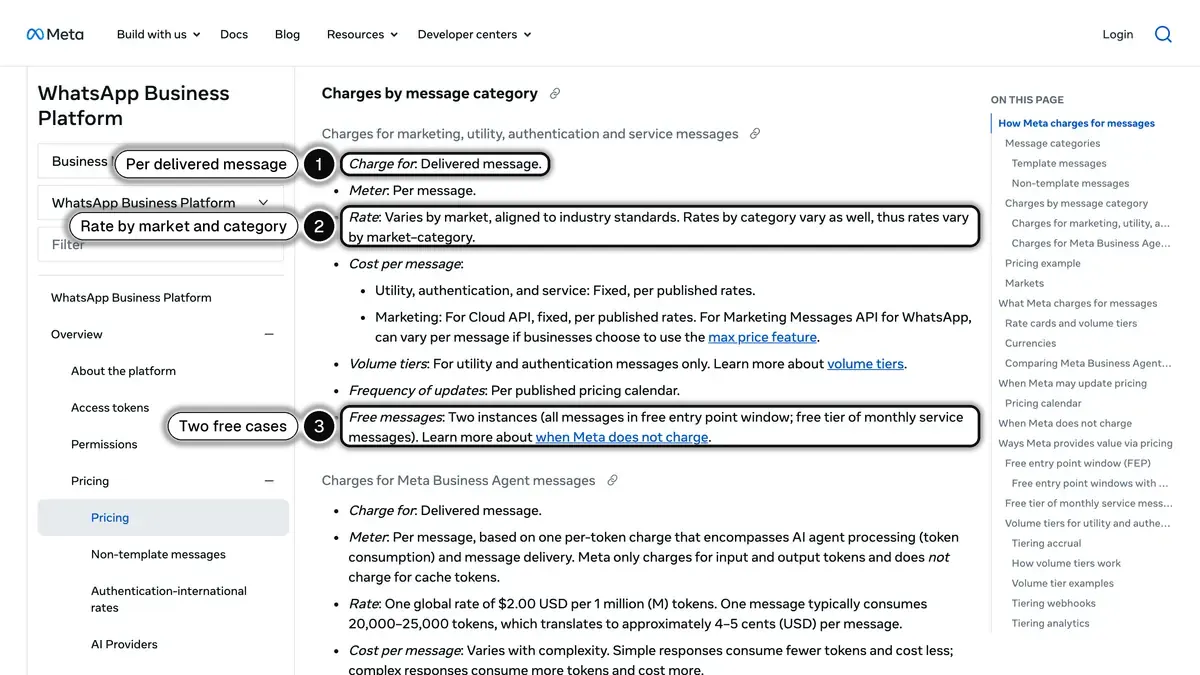 Source: Meta for Developers, WhatsApp Business Platform pricing, read on October 24, 2026.
Track cost per message by category: your blended cost depends on your mix of marketing and utility messages and on the countries your customers live in, so watch its trend month over month.
12. Lift Over Control
The gold-standard measurement. Hold out a random share of an opted-in segment (10 percent, for example) and never send to them. Compare conversion rates between the WhatsApp-receiving group and the held-out group.
The delta is your true incremental lift, stripped of cannibalization from email or organic traffic. Part of the revenue your dashboard attributes to WhatsApp would have come in anyway through other channels: the holdout test tells you how much, for your own store.
This is the number to report to your CFO. It is also the number that survives scrutiny when finance digs into attribution.
Calculating Total WhatsApp ROI
The complete formula:
ROI = (WhatsApp revenue − WhatsApp cost) ÷ WhatsApp cost × 100Identifying WhatsApp Revenue
Five revenue sources to track separately:
| Source | How to measure it |
|---|---|
| Abandoned cart recovery | Revenue from orders placed through the recovery links |
| Marketing campaigns / broadcasts | Revenue attributed to clicks on campaign messages |
| Post-purchase upsell | Additional orders from post-purchase messages |
| Back-in-stock alerts | Sales triggered by back-in-stock alerts |
| Chatbot-assisted sales | Orders assisted by the AI chatbot |
| Order notifications | Little direct revenue: count the "where is my order" tickets they prevent |
Identifying WhatsApp Cost
| Cost Line | Monthly cost |
|---|---|
| Kanal subscription | From €89/month (see pricing) |
| Meta marketing messages | 0.0712 euros per delivered message in France (Meta's rate calculator, October 24, 2026) |
| Meta utility messages | 0.0248 euros per delivered message in France |
| Meta service messages | Free up to 1,000 per number each month, then the utility rate |
| Team time (campaign creation) | Your team's hours × their hourly cost |
Worked Example: Hypothetical Fashion Store, 5,000 WhatsApp Contacts
Every input below is an assumption chosen to show the arithmetic, not a benchmark or a typical result. Replace each one with your own store's figures.
Monthly revenue from WhatsApp (assumed):
- Cart recovery: 120 recovered × 75 euros = 9,000 euros
- Campaigns (2 a month, 1,500 recipients each): 3,000 messages × 5 percent conversion × 65 euros = 9,750 euros
- Post-purchase upsell: 200 upsells × 35 euros = 7,000 euros
- Total revenue: 25,750 euros
Monthly cost:
- Kanal subscription: 89 euros
- Meta fees: 6,000 marketing messages delivered in France (the 3,000 campaign messages, plus 3,000 cart recovery and upsell messages, which Meta also classes as marketing) × 0.0712 euros = 427.20 euros
- Team time: not valued here, add your own
- Total cost: 516.20 euros
ROI = (25,750 − 516.20) ÷ 516.20 × 100 = 4,888 percent ROAS = 25,750 ÷ 516.20 = 49.9x
The result is only as realistic as the inputs: these figures reflect the assumptions above, not what a store should expect. Run the same arithmetic with your own recovered carts, conversion rates and AOV, or use the ROAS break-even calculator for your own modeling.
Attribution Models for WhatsApp
Last-Click
Simple, fast, defensible. The conversion is attributed to the last channel before purchase. A sensible default for stores just starting WhatsApp or with few conversions.
Multi-Touch
Splits credit across every touchpoint. More accurate, more complex. Useful once your channel mix gets denser (WhatsApp + email + SMS + paid).
Data-Driven
Uses machine learning to assign credit based on observed influence.
Example Attribution Windows
These are starting choices, not an industry standard: pick yours, write them down and keep them stable.
| Message Type | Attribution Window |
|---|---|
| Cart recovery | 7 days |
| Promotional campaign | 3 days |
| Back-in-stock alert | 3 days |
| Post-purchase upsell | 7 days |
| Welcome flow | 14 days |
Channel Comparison: WhatsApp vs Email vs SMS
| Metric | SMS | ||
|---|---|---|---|
| What "open" means | Read status per message | Tracking pixel, which some mail apps load automatically | Not tracked |
| Cost per message | 0.0712 EUR per marketing message in France (Meta) | Usually priced by contacts or send volume on your email platform | Per message, set by your SMS provider and the destination country (SMS pricing guide) |
| Best for | Cart recovery, urgency, two-way conversations | Newsletters, long-form nurture | Short alerts, deliverability fallback |
The table has no performance rows (CTR, conversion rate, ROAS) because there is no independent benchmark that measures the three channels the same way. Fill them in with your own reports once the channels run side by side.
The optimal mix runs all three: WhatsApp for high-touch moments (cart, urgency, support), email for newsletters and longer nurture, SMS as a deliverability fallback. The orchestration layer is usually Klaviyo.
How to Build Your Own WhatsApp Benchmark
Published WhatsApp benchmarks by vertical come from vendors, use different cost and attribution rules, and are not audited. The benchmark that matters is your own, and it takes four steps to build:
- Fix your definitions. Decide which costs go in the denominator (subscription, Meta fees, team time) and which attribution window applies to each message type (see Example Attribution Windows above). Keep them stable, or your trend lines will lie.
- Record a baseline per flow. Over two to three months, log read rate, CTR, conversion rate, revenue per recipient and opt-out rate separately for cart recovery, campaigns, back-in-stock and post-purchase messages.
- Measure incrementality. Run a holdout group on your main flows (KPI 12) and restate your ROAS on incremental revenue, not only on attributed revenue.
- Compare against yourself. Judge each new campaign or template against that baseline, not against a number from another store, another vertical or another country.
Tools for Measuring WhatsApp ROI
Kanal Analytics
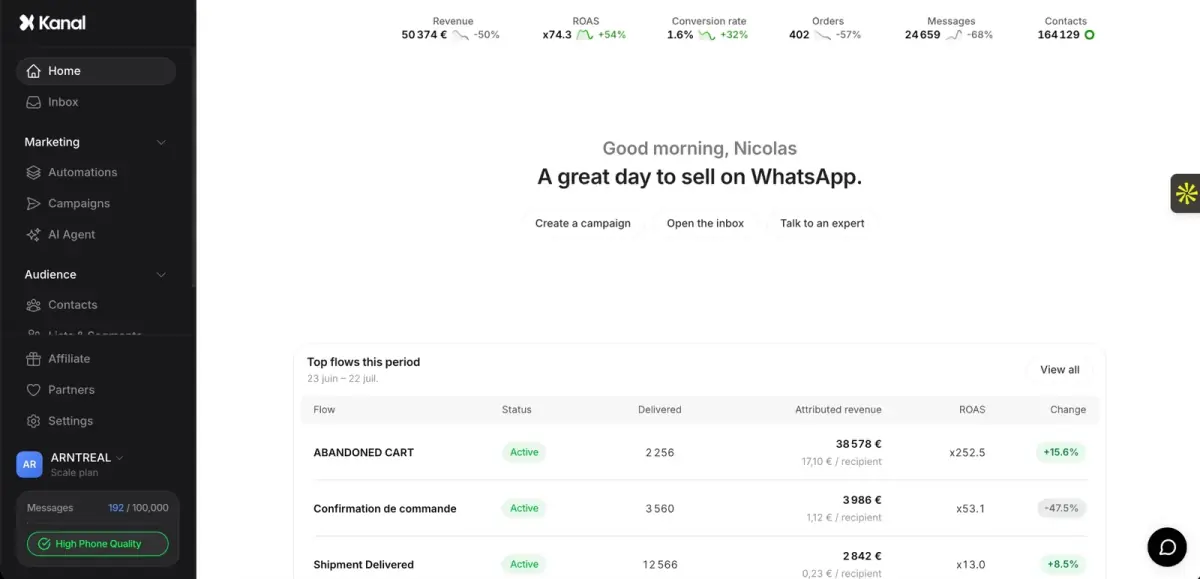
The performance dashboard, included in every Kanal plan, is the source of truth for WhatsApp KPIs:
- Revenue, orders and ROAS attributed to each campaign and automation (cart, upsell, back-in-stock)
- Delivered, read and reply rates for each broadcast
- Costs next to the revenue they brought back
Klaviyo
With the Klaviyo integration (from Kanal's Scale plan):
- A Klaviyo segment can be imported as the audience of a WhatsApp campaign, so it can target the same audience as an email
- Klaviyo flows can trigger WhatsApp messages, while email and SMS stay in Klaviyo
- You compare WhatsApp and email results flow by flow, each in its own dashboard
Google Analytics / GA4
UTM-tag every WhatsApp link to track conversions in GA4:
https://yourstore.com/product?utm_source=whatsapp&utm_medium=message&utm_campaign=cart_recoveryGoogle's Analytics Help explains that the parameter values then appear in the Traffic acquisition report (URL builders: Collect campaign data with custom URLs, read on October 24, 2026).
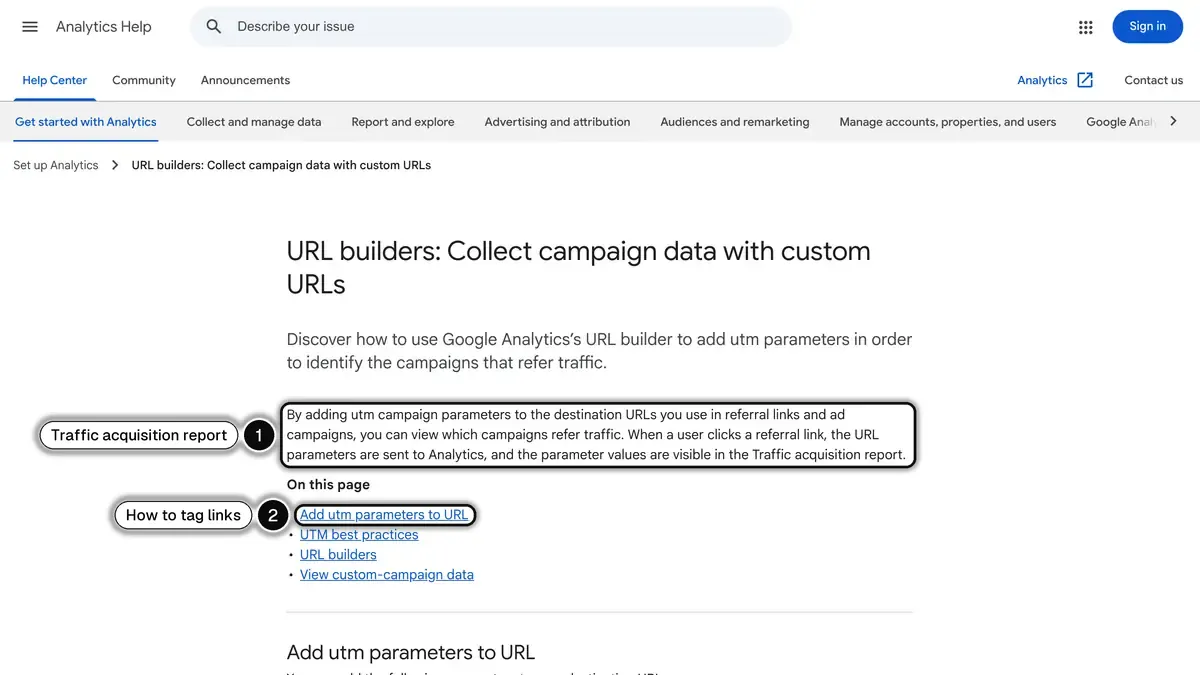 Source: Google, Analytics Help, URL builders, read on October 24, 2026.
Kanal ROAS Calculator
Our ROAS break-even calculator estimates your return based on contact volume, AOV, and expected conversion rates. Useful before installation as a sanity check.
Mistakes That Tank WhatsApp ROI
- Sending too many messages. Every extra marketing message is a chance to lose the contact. Set a monthly cap and raise it only if opt-outs stay flat. Quality over quantity.
- Skipping segmentation. Blasting your full list with the same message is the fastest path to a damaged sender reputation.
- Ignoring automation. Automated flows (cart, post-purchase, back-in-stock) reach each customer at the moment of intent, without anyone building a campaign. Skip them and you're leaving money in plain sight.
- Chasing the wrong KPI. Open rate alone tells you little about revenue. Focus on revenue per recipient and ROAS.
- Ignoring compliance. GDPR and Meta's policies impose real constraints. See our opt-in compliance guide. Non-compliance can mean both regulatory fines and a banned WhatsApp Business account.
Building Your WhatsApp KPI Dashboard
Reporting cadence:
| Cadence | KPIs |
|---|---|
| Daily | Messages sent, open rate, CTR, opt-outs |
| Weekly | Conversion rate, revenue per flow, recovered carts |
| Monthly | ROAS, ROI, CAC, CLV, total WhatsApp revenue, channel comparison |
| Quarterly | Trend lines against your own baseline, strategic recalibration |
Resources
- ROAS break-even calculator, model your own numbers
- Kanal pricing, see which plan matches your volume
- Book a demo, a walkthrough of the analytics dashboard
- Kanal on Shopify, install and start measuring
- WhatsApp Shopify integration, the technical setup
- AI chatbot, capture the reply-rate revenue you're currently missing
- GA4 UTM documentation
- Meta WhatsApp Business Platform pricing
Related reading: WhatsApp abandoned cart recovery templates | WhatsApp marketing statistics 2026 | WhatsApp broadcast guide | Conversational commerce guide | WhatsApp business pricing guide
See Kanal on your own store
- Your campaigns and cart reminders on WhatsApp, starting from your own store
- Post-purchase offers, back-in-stock alerts, then the AI agent that advises your customers
- You leave with the plan that fits and its price
From €89/month
- brands
- 500+
- to set up
- 5 min
- open rate on WhatsApp
- +90%
Nicolas helps e-commerce brands grow revenue with WhatsApp marketing. With deep expertise in Shopify ecosystems and conversational commerce, he shares proven strategies for abandoned cart recovery, broadcast campaigns, and AI-powered customer engagement.